When most people think of the dark web, one name immediately comes to mind — Tor. It’s the browser that made the hidden internet accessible to everyday users. But while Tor remains the gold standard for anonymity and privacy, it’s not the only browser that can take you there. In this article, we’ll explore what the dark web really is, why Tor became so famous, and which alternative browsers you can use to safely explore this mysterious corner of the internet.
What Is the Deep Web (and How It Differs From the Dark Web)?
Before diving into browsers, it’s important to understand what the deep web actually means. The deep web refers to all parts of the internet that aren’t indexed by search engines like Google or Bing. That includes private databases, academic journals, medical records, and even your email inbox — anything that requires a password or special permission to access.
Within the deep web, however, lies a smaller, hidden area called the dark web. This is where websites use special domain endings like .onion and require encrypted browsers to access. The dark web is often associated with illegal activity, but it’s also used by journalists, whistleblowers, and activists who need to communicate securely without government surveillance.
So, if you’ve ever wondered how people “surf” the dark web, the answer lies in using special browsers designed to protect your identity and hide your online activity.
Why Tor Is the Most Known Dark Web Browser

The Tor Browser (short for The Onion Router) is by far the most well-known gateway to the dark web. It became popular because it uses a unique system of layered encryption, bouncing your internet connection through several volunteer-run servers (called nodes or relays) around the world before reaching its destination.
This process masks your IP address and makes tracking your online activity extremely difficult. Tor also connects you directly to .onion sites, which can’t be accessed through normal browsers like Chrome or Firefox.
Beyond that, Tor’s fame comes from its open-source nature and backing by privacy advocates and organizations like the Tor Project, which promote digital freedom and anti-censorship.
However, while Tor offers excellent anonymity, it can sometimes be slow or unstable because of its multi-layer routing. That’s why many users look for alternatives — browsers that balance privacy with better performance.
Best Browsers to Access the Dark Web (Besides Tor)
Below are some of the most reliable browsers for exploring the dark web securely and privately, whether for research, journalism, or curiosity.
1. I2P (Invisible Internet Project)

Best for: Encrypted peer-to-peer connections and private communication
I2P is one of the strongest alternatives to Tor. Instead of routing traffic through public relays, I2P creates a fully decentralized, encrypted network called the “Invisible Internet.” It’s primarily used for messaging, file sharing, and hosting internal sites (known as eepsites), rather than for browsing the surface internet anonymously.
Key features:
- End-to-end encryption with layered tunnels for maximum privacy
- Built-in email and file-sharing applications
- Faster speeds than Tor in some use cases
- Hidden services similar to
.onionbut ending in.i2p
Drawbacks:
- Smaller network and community than Tor
- Limited access to standard web pages
Verdict:
If your goal is secure communication or creating your own hidden service, I2P is an excellent choice. But it’s not designed to browse the regular web.
2. Freenet

Best for: Anonymous publishing and sharing information
Freenet is another decentralized, peer-to-peer platform that emphasizes freedom of speech and censorship resistance. Users can host and share content anonymously without relying on centralized servers.
Freenet operates using two modes:
- Opennet, which connects you to random peers
- Darknet, where you connect only to trusted friends for maximum privacy
Key features:
- Encrypted data storage distributed across users’ computers
- Built-in messaging and microblogging tools
- Anonymous website hosting (freesites)
- Resistant to censorship and surveillance
Drawbacks:
- Not ideal for general browsing
- Slower than Tor for accessing
.onionsites
Verdict:
Freenet is more about securely sharing ideas and files than exploring the dark web, but its privacy-first design makes it a powerful tool for anonymous communication.
3. Tails OS (with Tor Preinstalled)

Best for: Maximum anonymity from a live operating system
While not a browser itself, Tails (The Amnesic Incognito Live System) deserves mention because it’s one of the safest ways to access the dark web. It’s a full Linux-based operating system that runs from a USB stick and leaves no trace on your computer once you shut it down.
Tails comes with the Tor Browser preinstalled, plus built-in tools for encryption, secure file storage, and anonymous email.
Key features:
- Runs entirely from RAM (no data saved to disk)
- Tor and other security tools included by default
- Ideal for whistleblowers, journalists, and activists
Drawbacks:
- Requires a USB or DVD setup
- Limited to Tor-based browsing
Verdict:
If your top concern is privacy and data safety, Tails provides a complete, self-contained environment that goes far beyond just browsing.
4. Subgraph OS
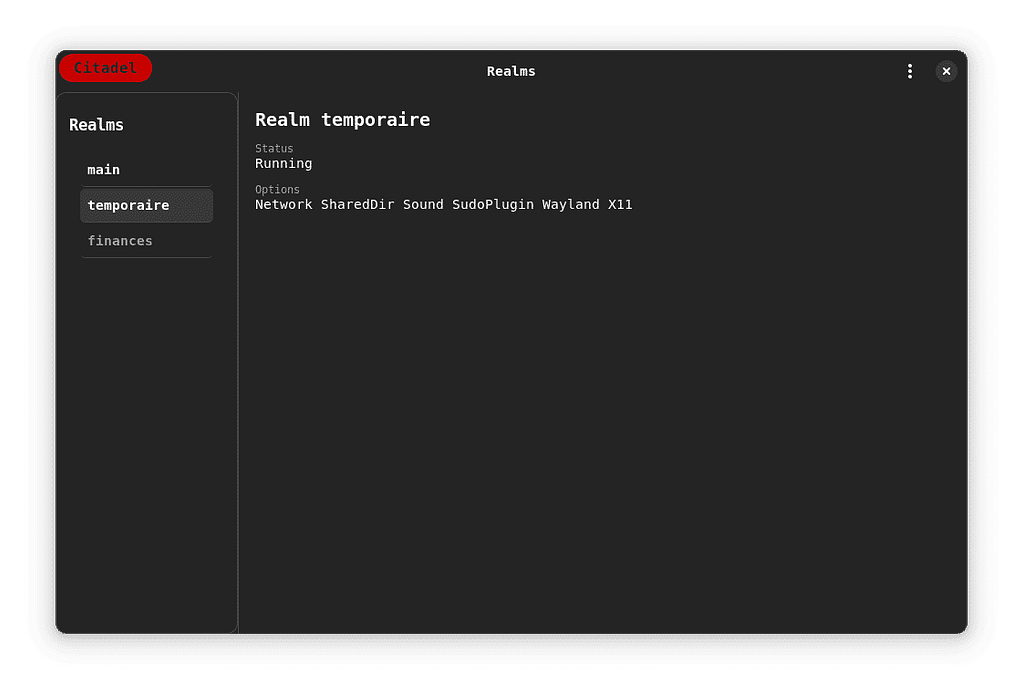
Best for: Advanced security and sandbox protection
Subgraph OS is another privacy-focused operating system designed for secure communications. It integrates Tor by default but adds sandboxing — isolating each application to prevent malware from spreading or stealing data.
Key features:
- Built-in Tor routing
- Encrypted instant messaging and email
- Hardened Linux kernel for protection against exploits
Drawbacks:
- Still in development with limited updates
- Geared toward advanced users
Verdict:
If you want the anonymity of Tor with additional system-level protection, Subgraph OS is a smart (though niche) option.
5. Whonix

Best for: Running a virtual machine for complete anonymity
Whonix is a specialized Linux distribution that runs inside a virtual machine (VM). It uses two components — one acts as a Tor gateway, and the other as your workstation. This separation ensures your IP can’t leak, even if malware tries to compromise your browser.
Key features:
- Complete traffic routed through Tor
- Runs inside a secure virtual environment
- Strong protection against IP leaks and DNS exposure
Drawbacks:
- Slower performance due to virtualization
- Requires technical knowledge to set up
Verdict:
Whonix is a favorite among privacy professionals who need to isolate their dark web activities from their main operating system.
How to Stay Safe on the Dark Web
No matter which browser you choose, always remember that the dark web is not inherently safe. Many sites host scams, illegal marketplaces, or malware. Follow these guidelines to protect yourself:
- Use a reputable VPN before opening any dark web browser.
- Never share personal information or use your real email address.
- Avoid downloading files from untrusted sources.
- Keep your software updated to patch vulnerabilities.
- Stick to verified
.oniondirectories and resources.
Final Thoughts
While Tor remains the most famous and widely used browser for exploring the dark web, it’s far from the only option. Tools like I2P, Freenet, Tails, Subgraph OS, and Whonix each offer unique advantages — from decentralized communication to operating-system-level anonymity.
Ultimately, the best browser depends on what you’re trying to do. If you want to browse .onion sites, Tor or Whonix might be your best bet. But if your goal is anonymous file sharing or private publishing, I2P or Freenet could be more suitable.
Exploring the dark web can be fascinating, but it’s not something to take lightly. Equip yourself with the right tools, use common sense, and always prioritize security over curiosity.