Android users love the freedom the operating system offers — the ability to customize nearly everything, install any app you want, and access a world of software on the Google Play Store. But that freedom comes with a hidden price: many Android apps you use every day are quietly stealing your data, draining your battery, or even running malicious code in the background.
If your smartphone has been feeling slower lately or your battery life seems to vanish faster than it used to, it might be time to take a closer look at what’s installed on your device. In this guide, we’ll go over 10 Android apps you should delete immediately to protect your privacy and security, save storage space, and keep your phone running smoothly.
And if you want to understand why so many “free” apps are secretly designed to manipulate users into spending money, check out our deep dive: Freemium Fatigue: How Free Apps Manipulate You into Paying More Than You Think.
Why You Should Uninstall or Disable Dangerous Android Apps
Many Android users assume that if an app is available on the Google Play Store, it’s safe. Unfortunately, that’s far from true. Google Play Protect does scan apps for malware and adware, but new forms of malicious code slip through every week.
Even popular Android apps can abuse permissions, run in the background to track your location, or share your personal data with advertisers and analytics companies. Other apps are simply bloatware — preinstalled by phone manufacturers or carriers — that waste storage space and drain your battery life.
Uninstalling apps like these can:
- Improve performance and battery life
- Protect your online privacy
- Free up internal storage
- Reduce background data usage
- Stop apps from collecting your data or tracking your activity
Let’s look at the 10 types of Android apps you should remove or disable right now.
1. Free Flashlight Apps – A Classic Example of Data Theft
Remember when smartphones didn’t have built-in flashlights? Back then, flashlight apps were useful. But today, every Android version already includes this feature in the quick settings menu.
The problem is that many third-party flashlight apps still available for download on the Google Play Store come loaded with tracking scripts, adware, and even trojans. These apps often request unnecessary permissions — like access to your contacts, location data, or even call logs — just to turn on your flashlight.
If you have any flashlight app other than the one built into your Android phone, delete the app immediately. It’s one of the oldest tricks in the book for spying on users and stealing personal data.
2. Free VPN Apps – Not All Are Safe
A VPN app sounds like a great way to protect your privacy and security, but ironically, many free VPNs do the opposite. Apps like these often log your browsing data, inject ads, or sell your user data to advertisers.
Even worse, some VPN apps available on the Play Store contain malicious code that can collect your data and monitor your network activity.
Stick to trusted providers that publish clear privacy policies and are transparent about what data they collect. Otherwise, consider uninstalling any free VPN that looks suspicious, especially if it offers “unlimited bandwidth” or doesn’t require registration — those are major red flags.
3. QR Code Scanners – A Relic You Don’t Need
If you still have a QR scanner app installed, it’s time to say goodbye. Modern Android and iOS devices can already scan QR codes directly through the camera app.
Many of the old QR apps were caught spreading adware or redirecting users to shady websites. Some of these apps run in the background, pushing notifications or collecting your browsing data without your consent.
Delete these apps and use your built-in camera instead. It’s faster, safer, and won’t spy on you.
4. Bloatware and Preinstalled Apps
Almost every Android phone comes with preinstalled apps you didn’t ask for — also known as bloatware. These apps might include manufacturer tools, redundant app stores, or carrier-branded software that clutters your home screen.
While not all bloatware is malicious, many of these apps run in the background, drain battery life, and consume internal storage. Some even collect usage data and send it back to the manufacturer.
To clean up your device:
- Go to Settings > Apps
- Review all installed apps
- Uninstall or disable the ones you don’t use
Even if you can’t uninstall them completely, disabling them prevents them from running.
5. Social Media Apps That Track You 24/7
It’s no secret that social media apps are among the biggest offenders when it comes to privacy. Apps like Facebook, Instagram, Snapchat, and TikTok constantly track your behavior, scan your contacts, and collect location data — even when you’re not actively using them.
Facebook alone has faced endless controversy over how it handles user data, while Instagram’s data-sharing practices have raised similar privacy concerns. These apps can also run in the background, drain your battery life, and quietly upload analytics about your activity.
If you’re serious about protecting your privacy and security, consider taking a break from these apps or deleting them entirely. You can easily uninstall Facebook or delete Instagram following our step-by-step guides — both explain how to remove your accounts safely and make sure your personal data isn’t left behind.
Of course, you don’t have to disappear from social media completely — you can still access these platforms through your browser if needed. But if you care about your battery life, storage space, and especially your online privacy, removing these apps from your Android phone is a smart move.
6. “Cleaner” and “Booster” Apps – Fake Optimization Tools
Many apps that claim to speed up your phone or clean your cache are actually bloatware apps in disguise. Apps like Clean Master, DU Speed Booster, and similar tools once dominated the Play Store but were later removed due to security issues and privacy violations.
Android’s operating system is already designed to manage memory and performance efficiently. These “optimization” tools often run in the background, waste battery, display ads, and collect data about how you use your device.
If you see any cleaner app on your phone, uninstall it immediately. The only thing they’re cleaning out is your personal data.
7. Third-Party App Stores and Download Managers
Installing apps from third-party sources may sound convenient, but it’s one of the riskiest things you can do on Android. Apps available outside the Google Play Store don’t go through the same Play Protect screening and are much more likely to contain malware or adware.
Even if you downloaded a third-party app store just once to grab a specific game or APK, you should uninstall these apps right now. They often run in the background and can automatically install unwanted apps on your device without permission.
Always stick to the Google Play Store or trusted sources for downloading apps — it’s the best way to keep your Android device secure.
8. Weather Apps That Track Your Location
Weather apps are among the most common culprits when it comes to overreaching permissions. Many of them request precise location data, call logs, or even storage access — all to display a simple forecast.
Some of these apps were caught selling location data to advertisers or even government agencies. Unless you trust the privacy policy of the weather app you’re using, consider uninstalling it and using Google Weather or your phone’s default weather widget instead.
9. Cloned or Fake Versions of Popular Apps
Hackers often release fake versions of popular Android apps like WhatsApp, Facebook, or Instagram on third-party websites. These clones may look identical but include malicious code that can steal your personal data, intercept messages, or push unwanted ads.
Even on the Play Store, some fake apps slip through the cracks — especially those with names that are just slightly misspelled. Always check:
- The developer name
- The number of downloads
- The reviews
- The permissions requested
If something looks off, delete the app right away.
10. Unused Apps Taking Up Space
Finally, let’s talk about the unused apps sitting on your phone. Over time, we all accumulate dozens of apps we never open again — games, QR tools, photo editors, or VPNs we forgot about.
Even if they seem harmless, many of these apps run background processes, sync data, or collect usage stats. They also eat into your storage space and may slow down your phone’s performance.
Go through your apps installed and remove anything you haven’t used in the past month. You can always reinstall it later if you change your mind.
How to Uninstall or Disable Apps on Android
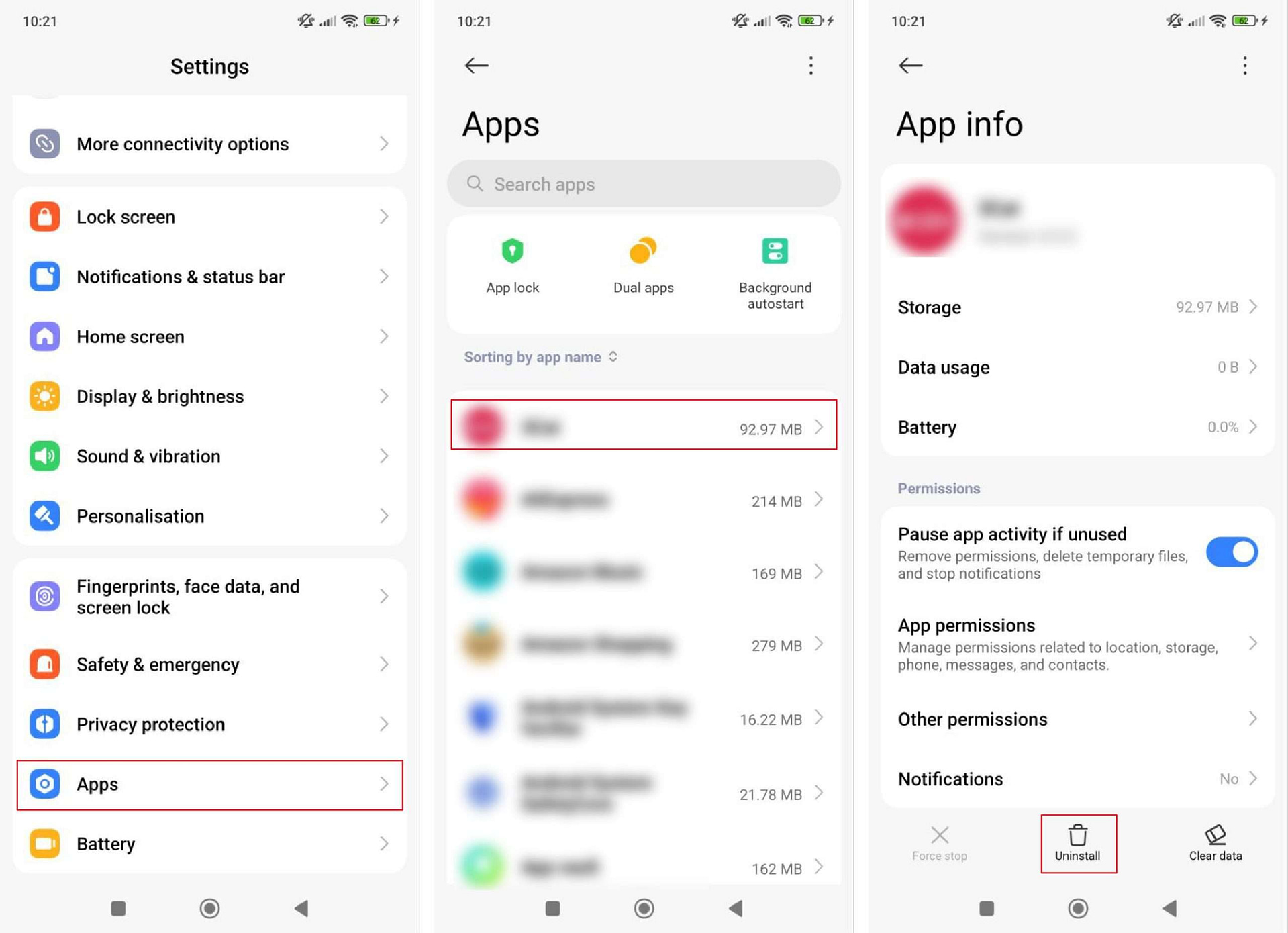
If you’re not sure how to start cleaning up your Android device, here’s a quick guide:
- Open Settings → Apps
- Tap See all apps
- Select the app you want to remove
- Tap Uninstall (or Disable for system apps)
- Confirm the action
If an app refuses to uninstall, it might have device administrator permissions. To fix this:
- Go to Settings → Security → Device admin apps
- Disable permissions for that app
- Then return and uninstall it normally
Final Thoughts: Protect Your Privacy and Security
Your smartphone is more than just a gadget — it’s a gateway to your personal world. But many apps can also be a shortcut for hackers, advertisers, and shady developers to track your location, collect your data, or spy on your activity.
Uninstalling unnecessary or suspicious apps is one of the easiest ways to improve privacy and security, extend battery life, and regain control of your Android device.
As a rule of thumb:
- Be wary of apps that claim to optimize, clean, or protect your phone for free.
- Always check permissions before installing anything.
- Regularly review what’s installed on your device and remove what you don’t need.
And if you’re curious about how even legitimate apps use subtle psychological tricks to push subscriptions and in-app purchases, don’t miss our detailed article on Freemium Fatigue.
By cleaning up your Android and removing shady apps, you’re not just freeing up storage — you’re reclaiming your digital freedom.